פתח תפריט ניווט

קטגוריות ראשיות

DALI Wireless Subwoofer Receiver

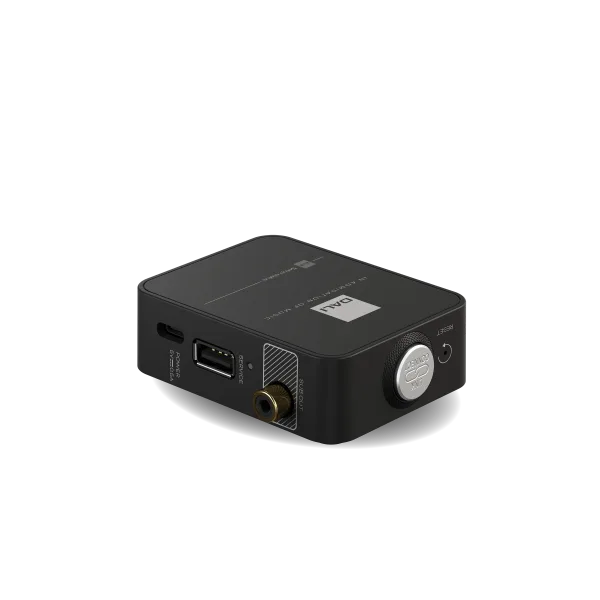
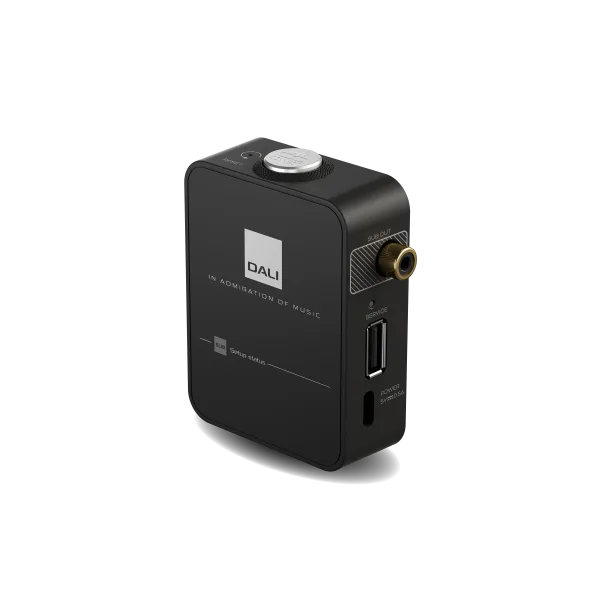
המודול WSR Wireless Subwoofer Receiver של DALI הוא תוספת חכמה למערכת SOUND HUB ומאפשר חיבור אלחוטי של סאב וופר אקטיבי לקבלת חווית סאונד נקייה וללא כבלים מיותרים. המודול משדרג כל מערכת סטריאו או קולנוע ביתי מסדרת DALI EQUI בחיבור פשוט ומהיר לסאב וופר קיים. תהליך ההתקנה פשוט ונוח: תחילה מחברים את המודול לסאב וופר באמצעות כבל RCA המסופק בערכה. לאחר מכן מחברים את ספק הכוח לשקע חשמל ולמודול עצמו והוא נדלק באופן מיידי. מפעילים את הסאב וופר ומכוונים את עוצמת השמע לכרבע מהעוצמה. בהמשך מוודאים שה-SOUND HUB במצב דלוק ולוחצים על כפתור LINK & CONNECT בגב ה-HUB ולאחר מכן גם על כפתור זהה ב-WSR לסיום החיבור. לסיום, מומלץ לכוון את עוצמת הסאב וופר והפילטר הגבוה לפי הוראות המדריך לקבלת תוצאה מושלמת. כולל אחריות היבואן הרשמי בישראל – כל דגמי חברת DALI עכשיו במחיר מנצח כאן בפיוצ’ר באולם התצוגה המרכזי בתל אביב ובאתר 24/7
קרדיט:

Wireless Subwoofer Receiver

The WSR (Wireless Subwoofer Receiver) expansion module for the DALI SOUND HUB adds wireless connectivity to your active subwoofer for seamless integration into any DALI EQUI stereo or surround sound setup.

DALI

Step 1 - Plug In

Switch off the subwoofer before connecting the WSR. Use the supplied RCA Phono cable to connect the WSR to the LFE input of the subwoofer (if no LFE input, check manual).

DALI

Step 2 - Power On

Connect the WSR power supply to a mains socket, then connect it to the WSR – the WSR will switch on immediately. Switch on the subwoofer and turn the volume to around 25%, if possible.

DALI

Step 3 - Connect

Ensure your SOUND HUB (COMPACT) is ON. Press the LINK & CONNECT (L&C) button on its rear panel. Now do the same on the WSR. Finish by pressing the L&C button on the SOUND HUB.

DALI

Step 4 - Adjust & Enjoy

To enjoy the best possible results, we recommend setting the subwoofer volume and high-pass filter controls appropriately (as described in the SUB manual).


TURN YOUR SUB WIRELESS

Convert active sub into a wireless sub

Truly immersive surround sound is best with a subwoofer. If you already have an active subwoofer, the DALI WSR (Wireless Subwoofer Receiver) is just the ticket to integrate it into a wireless EQUI surround system. Simply connect the sub-out jack to the subwoofer input and power the WSR from a USB-C power supply. Now your subwoofer is officially part of your active wireless surround system.

DALI


Specifications


Signal Sample Rate

96 kHz


Signal Resolution

24-bit


Audio Input

Wireless audio interface


Audio Output

Mono RCA connector


Audio Output Level

2 V RMS


Power Supply Input

USB type C (5 V DC, 0.5 A)


מחיר: 790 ₪
משלוח חינם
משלוח חינם: 0 ₪
אחריות: אחריות לשנה
זמן אספקה: 7 ימים , קיימת אפשרות לאיסוף עצמי
למה לקוחות קונים אצלנו:
  • אחריות: אחריות לשנה 
  • אפשרות לעד 12 תשלומים ללא ריבית 
  • משלוח חינם, קניה מאובטחת ושירות לקוחות מעולה 
אחריות לשנה חודשי אחריות
משלוח חינם משלוח חינם
קניה בטוחה

מידע נוסף

Wireless Subwoofer Receiver

The WSR (Wireless Subwoofer Receiver) expansion module for the DALI SOUND HUB adds wireless connectivity to your active subwoofer for seamless integration into any DALI EQUI stereo or surround sound setup.

DALI

Step 1 - Plug In

Switch off the subwoofer before connecting the WSR. Use the supplied RCA Phono cable to connect the WSR to the LFE input of the subwoofer (if no LFE input, check manual).

DALI

Step 2 - Power On

Connect the WSR power supply to a mains socket, then connect it to the WSR – the WSR will switch on immediately. Switch on the subwoofer and turn the volume to around 25%, if possible.

DALI

Step 3 - Connect

Ensure your SOUND HUB (COMPACT) is ON. Press the LINK & CONNECT (L&C) button on its rear panel. Now do the same on the WSR. Finish by pressing the L&C button on the SOUND HUB.

DALI

Step 4 - Adjust & Enjoy

To enjoy the best possible results, we recommend setting the subwoofer volume and high-pass filter controls appropriately (as described in the SUB manual).


TURN YOUR SUB WIRELESS

Convert active sub into a wireless sub

Truly immersive surround sound is best with a subwoofer. If you already have an active subwoofer, the DALI WSR (Wireless Subwoofer Receiver) is just the ticket to integrate it into a wireless EQUI surround system. Simply connect the sub-out jack to the subwoofer input and power the WSR from a USB-C power supply. Now your subwoofer is officially part of your active wireless surround system.
DALI


Specifications


Signal Sample Rate

96 kHz


Signal Resolution

24-bit


Audio Input

Wireless audio interface


Audio Output

Mono RCA connector


Audio Output Level

2 V RMS


Power Supply Input

USB type C (5 V DC, 0.5 A)


\